
Hide.me VPN Download – Free VPN for Android & PC
Download Hide.me VPN APK, install the app, connect to a server, and start browsing privately and securely. You can use the service on Android, Windows, macOS, iPhone, iPad, and other devices. You can use it for gaming, websites, social media, TikTok Live, live streaming, video platforms, and other websites you want to visit privately.

What Is hide.me VPN?
hide.me VPN helps users browse the internet privately. The service offers apps for Android, Windows, macOS, iPhone, iPad, and other platforms. hide.me also provides a free plan with unlimited data, a no-logs policy, and access to selected server locations.
Why We Ranked hide.me VPN in Our Top 10?
We ranked hide.me VPN in our top 10 because it offers good privacy, security, speed, unlimited data, and useful features.
The free plan gives you unlimited data, access to 8 server locations, and 1 connection at a time. You can also use its main security features and no-logs policy without paying.
Hide.me VPN vs Other VPNs
Hide.me VPN is a strong option for users who want a free VPN without a monthly data limit. Many free VPNs put a limit on how much data you can use, but hide.me gives you unlimited data on its free plan.
| VPN | Benefits | Drawbacks |
|---|---|---|
| hide.me VPN | Unlimited free data, strong privacy, no-logs policy, easy to use, supports multiple platforms | Fewer free server locations and 1 connection on the free plan |
| Proton VPN | Unlimited free data, strong privacy, good security, no ads | Limited free server choices and servers can become busy |
| Windscribe | Useful privacy tools, flexible features, and a good free plan | Free data is limited and some features require a paid plan |
| PrivadoVPN | Good speed, strong privacy features, easy to use, and supports streaming | Free plan has a monthly data limit |
| TunnelBear | Very simple interface, beginner-friendly, and easy to connect | Free plan has a small monthly data limit |
It is a good choice for users who want unlimited free data and privacy, while Proton VPN focuses strongly on privacy, Windscribe offers flexibility, PrivadoVPN is useful for speed and streaming, and TunnelBear is a simple choice for beginners.
Hide.me VPN APK Downloading
Get the latest hide.me VPN APK directly from 10BestFreeVPN.com and install it on your compatible Android device. Our download page provides an easy way to access the app without dealing with modified or unreliable APK files.
The official hide.me Android application receives regular updates that improve performance, fix bugs, and introduce useful features. Downloading the latest version helps you stay up to date with these improvements and enjoy a smoother VPN experience. Before installation, make sure your device meets the app’s requirements and has enough storage for the APK and installation process.
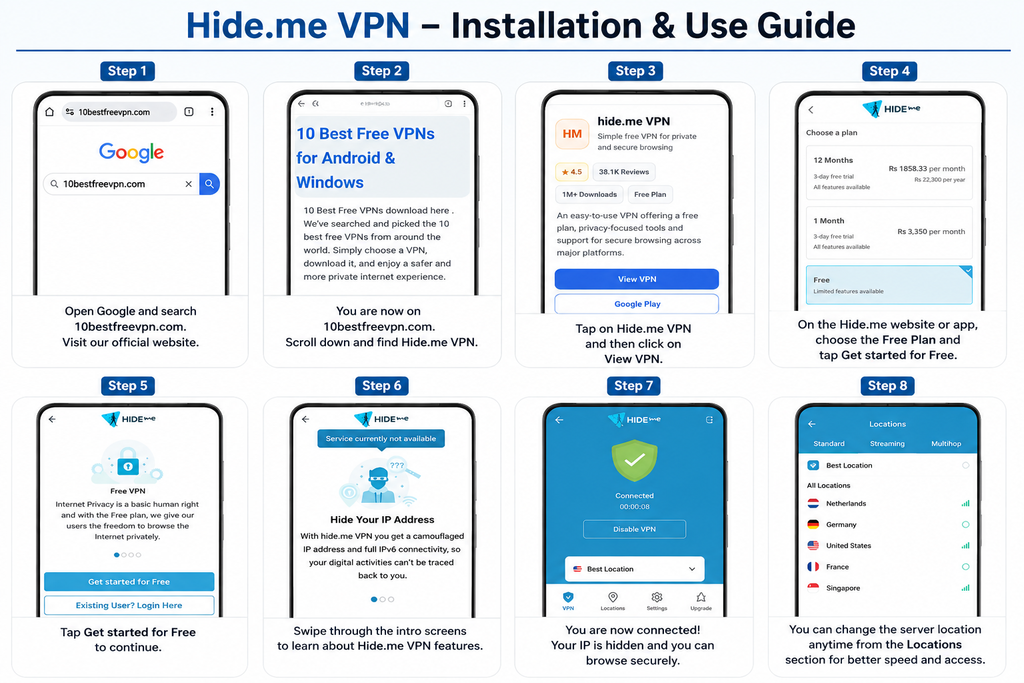
hide.me VPN Installation Guide
Follow the steps below to learn how to download, install, and use hide.me VPN for free on Android,
People Reviews of hide.me VPN
Users can have different experiences with a VPN based on their location, internet connection, device, and selected server. Reddit discussions can therefore provide useful insight into how the service performs in real-world situations.
Community members often talk about connection speed, privacy, free usage, server availability, and reliability. Keep in mind that these comments reflect personal experiences rather than controlled laboratory tests.
Windows app experience
hide.me VPN delivers a smooth and secure Windows experience with fast server selection and useful privacy tools. Its Windows app includes Split Tunneling, Kill Switch, IP Leak Protection, DNS Leak Protection, StealthGuard, and Auto Server selection.
The app can automatically select a suitable server, connect with one click, and keep your preferred settings ready for everyday use. hide.me also continues to improve its Windows application through performance updates, security enhancements, and bug fixes.
With its combination of speed, security, flexibility, and easy controls, hide.me makes a strong choice for Windows users who want a private and reliable VPN experience.
Android App Experience
hide.me VPN offers a simple and user-friendly Android experience with an easy-to-navigate interface and quick access to VPN connections. Users can select a server, connect with a tap, and manage their VPN connection directly from their Android device.
The Android app provides useful privacy features, including Split Tunneling, Stealth Guard, and a Kill Switch, giving users greater control over their VPN connection and internet traffic. Its straightforward design also makes it easy to access the main VPN functions without dealing with complicated controls.